Stox AI: TopstepX Analyzer1.0.11
Publisher Description


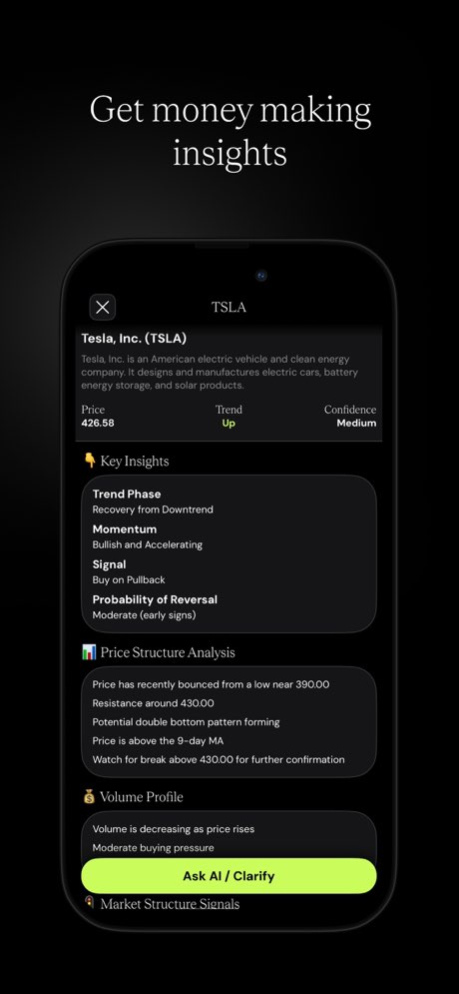
Transform your trading with Stox AI - the smartest way to analyze charts and make informed decisions.
Simply snap a photo of any stock, crypto, or forex chart, and let our advanced AI instantly decode patterns, trends, and key signals that could impact your next trade.
HOW IT WORKS
- Snap or Import
Take a photo of any chart or import directly from TradingView.
Our AI analyzes stocks, cryptocurrencies, forex pairs, and more.
- Instant AI Analysis
Get comprehensive analysis in seconds including:
. Trend direction and strength
. Support and resistance levels
. Chart patterns (head & shoulders, triangles, flags, and more)
. Technical indicators interpretation
. Price targets and key levels
- Chat with AI Trading Assistant
Ask follow-up questions about your analysis. Our AI assistant can search real-time market data, earnings dates, analyst ratings, and breaking news to give you the full picture.
- Track Your Analyses
Save and review all your chart analyses in one place. Build your trading history and learn from past decisions.
KEY FEATURES
. Instant chart recognition and analysis
. Support for stocks, crypto, forex, and commodities
. AI chat with real-time web search capability
. TradingView chart import
. Local storage - your data stays on your device
. Clean, intuitive dark mode interface
WHO IS THIS FOR?
. Day traders looking for quick chart insights
. Swing traders analyzing multiple setups
. Crypto enthusiasts tracking volatile markets
. Beginners learning technical analysis
. Anyone who wants AI-powered trading assistance
SUBSCRIPTION OPTIONS
Stox AI offers weekly and annual subscription plans to unlock unlimited analyses and full AI chat capabilities.
. Payment will be charged to your Apple ID account at confirmation of purchase
. Subscription automatically renews unless canceled at least 24 hours before the end of the current period
. You can manage and cancel your subscription in your App Store account settings
DISCLAIMER
Stox AI is for informational and educational purposes only. It does not provide financial advice. All trading involves risk. Past performance does not guarantee future results. Always do your own research before making investment decisions.
Privacy Policy: https://telegra.ph/Privacy-Polic-11-23
Terms & Conditions: https://telegra.ph/Terms--Conditions-11-28-4
Support: brainhealapp@gmail.com
Version History - Today tab: stocks entering windows they've historically risen in, with buy and sell dates
- Save setups and get an evening reminder when a new session opens
- Invite friends: when one subscribes, you both get free time 1.0.11 Aug 23 Stability improvements. 1.0.10 Jul 27 Stability improvements. 1.0.9 Jul 26 Stability improvements. 1.0.8 Jul 25 Improved chart analysis. 1.0.7 Jul 23 Stability improvements. 1.0.6 Apr 4 Stability improvements. 1.0.5 Mar 31 Stability improvements. 1.0.4 Mar 11 Usability improvements. 1.0.3 12/03/2025 Stability improvements. 1.0.2 12/02/2025 The analysis strategy was improved. 1.0.1 12/01/2025 1.0 12/01/2025
About Stox AI: TopstepX Analyzer
The company that develops Stox AI: TopstepX Analyzer is Oleksandr Lisovyk. The latest version released by its developer is 1.0.11.
To install Stox AI: TopstepX Analyzer on your iOS device, just click the green Continue To App button above to start the installation process. The app is listed on our website since 2026-10-14 and was downloaded 6 times. We have already checked if the download link is safe, however for your own protection we recommend that you scan the downloaded app with your antivirus. Your antivirus may detect the Stox AI: TopstepX Analyzer as malware if the download link is broken.
How to install Stox AI: TopstepX Analyzer on your iOS device:
- Click on the Continue To App button on our website. This will redirect you to the App Store.
- Once the Stox AI: TopstepX Analyzer is shown in the iTunes listing of your iOS device, you can start its download and installation. Tap on the GET button to the right of the app to start downloading it.
- If you are not logged-in the iOS appstore app, you'll be prompted for your your Apple ID and/or password.
- After Stox AI: TopstepX Analyzer is downloaded, you'll see an INSTALL button to the right. Tap on it to start the actual installation of the iOS app.
- Once installation is finished you can tap on the OPEN button to start it. Its icon will also be added to your device home screen.
Program Details
System requirements
Download information
Pricing
Version History
version 1.0.11
posted on 2026-10-14
Version History - Today tab: stocks entering windows they've historically risen in, with buy and sell dates
- Save setups and get an evening reminder when a new session opens
- Invite friends: when one subscribes, you both get free time 1.0.11 Aug 23 Stability improvements. 1.0.10 Jul 27 Stability improvements. 1.0.9 Jul 26 Stability improvements. 1.0.8 Jul 25 Improved chart analysis. 1.0.7 Jul 23 Stability improvements. 1.0.6 Apr 4 Stability improvements. 1.0.5 Mar 31 Stability improvements. 1.0.4 Mar 11 Usability improvements. 1.0.3 12/03/2025 Stability improvements. 1.0.2 12/02/2025 The analysis strategy was improved. 1.0.1 12/01/2025 1.0 12/01/2025
version 1.0.11
posted on 2026-08-23
Version History - Today tab: stocks entering windows they've historically risen in, with buy and sell dates
- Save setups and get an evening reminder when a new session opens
- Invite friends: when one subscribes, you both get free time 1.0.11 6h ago Stability improvements. 1.0.10 Jul 27 Stability improvements. 1.0.9 Jul 26 Stability improvements. 1.0.8 Jul 25 Improved chart analysis. 1.0.7 Jul 23 Stability improvements. 1.0.6 Apr 4 Stability improvements. 1.0.5 Mar 31 Stability improvements. 1.0.4 Mar 11 Usability improvements. 1.0.3 12/03/2025 Stability improvements. 1.0.2 12/02/2025 The analysis strategy was improved. 1.0.1 12/01/2025 1.0 12/01/2025
version 1.0.6
posted on 2026-07-23
Version History Stability improvements. 1.0.6 Apr 4 Stability improvements. 1.0.5 Mar 31 Stability improvements. 1.0.4 Mar 11 Usability improvements. 1.0.3 12/03/2025 Stability improvements. 1.0.2 12/02/2025 The analysis strategy was improved. 1.0.1 12/01/2025 1.0 12/01/2025
version 1.0.4
posted on 2026-03-11
Stability improvements.
version 1.0.3
posted on 2025-12-03
Usability improvements.
